Starter
1 compact AI server
e.g. Mac mini · up to ±15 users
- Local chat assistant
- RAG over one knowledge source
- 2 local models
- Training for your team
- Fully offline after handover
An AI assistant that answers from your own case files, manuals and quotes, with citations. It runs on your own hardware in your network: a Mac mini, a Mac Studio or a GPU server, sized to your users and models. We train your team and then close the connection to the cloud: client data no longer leaves the building. For accountants, notaries, law firms, healthcare, HR and technical companies.
30 minutes · no obligation · reply within one business day
After installation we block all outbound AI traffic. No OpenAI, no Google, and far less exposure to data leaks.
One-off hardware and setup, then no usage fees. The more your team uses it, the cheaper it gets.
From a quiet Mac mini in a cupboard to a GPU server in your server room. We pick what fits your users and models.
Data physically stays with you. With logging, per-user permissions and documentation for your records.
A fixed project of a few weeks. We work on site, with your team.
Where does your knowledge live? We map documents, systems and use cases, and pick the right models and hardware.
We place and configure the hardware in your own network: Mac minis or a Mac Studio, or a Linux server with NVIDIA GPUs for heavier models and more users. Local models via Ollama, MLX or vLLM.
We connect manuals, SharePoint, file shares and archives. Answers with sources, only from documents the user is allowed to see.
Prompts, your own terminology and local agents for your tasks: quotes, summaries, email drafts, searching case files.
Hands-on training for users and an admin course for IT. Including AI literacy for the AI Act.
We close all outbound connections. Updates only happen during a controlled maintenance window. From then on, everything runs locally.
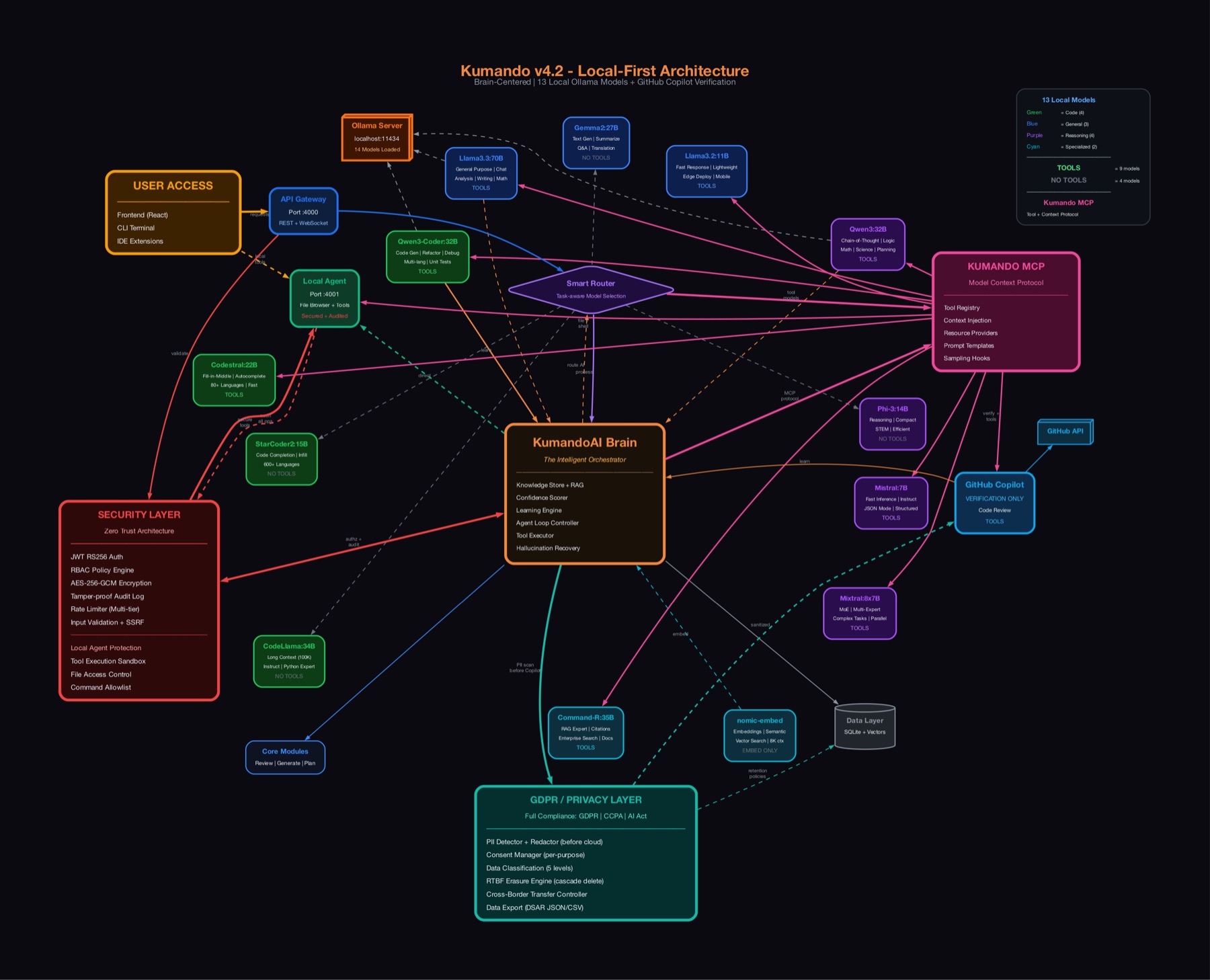
It’s the same local-first architecture we built for our own AI software factory, Kumando: several local models, a smart router that picks the right model per task, RAG, tools and a privacy layer.
Hardware at cost, installation and configuration at our hourly rate, training per session. Optional maintenance with controlled updates.
For most business tasks, yes: summarising, searching documents, drafting emails and quotes, answering questions about your own knowledge. With RAG over your data they often beat a general cloud model that doesn’t know your business.
Whatever fits your team and your models. For small teams a Mac mini or Mac Studio is often ideal: Apple Silicon shares memory between CPU and GPU, so large language models run quietly and efficiently. For many users, heavy models or fine-tuning we install a Linux server with NVIDIA GPUs. Your existing server room works too.
After handover we block all outbound connections from the AI systems at the firewall. Models, documents and conversations stay inside your network. We only update during a pre-agreed maintenance window.
One compact server (for example a Mac mini) is enough for a small team. For more users or heavier models we install a Mac Studio or a GPU server, with a router that spreads the load.
Yes. You can add models, knowledge sources, agents and hardware. Everything stays yours and runs on your machines.
Book a free 30-minute call. You get honest advice on what we would build, what it costs and what it returns, even if you don’t work with us afterwards.